

参考资料:
https://blog.csdn.net/lizongti/article/details/128087682
https://blog.csdn.net/u010420859/article/details/125747494
Linux cifs挂载远程windows共享目录
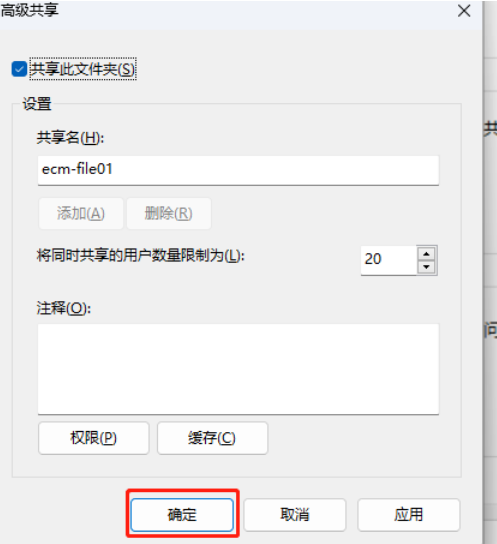
1.开启共享windows目录权限

选中需要共享的文件夹

2.安装Linux依赖
yum -y install cifs-utils
3.设置自动挂载
vi /etc/fstab
//aaa/ecm-file01 /bbb cifs defaults,username=ccc,password=ddd,vers=2.0 0 0
其中aaa是windows的ip地址;ecm-file01是windows挂载共享文件夹名字;/bbb是挂载在Linux的挂载点;ccc和ddd分别是username和password是Windows的用户名和密码;vers为2.0版本
设置可读写,组和其他人无权限并且属主属主是root

mount -a加载一下挂载
卸载挂载
umount /bbb 卸载windows挂载
Linux挂载Linux共享(A与B共享)
1.环境准备
两台共享Linux系统AB都执行
yum -y install nfs-utils rpcbind (Linux系统B可以只装nfs)
创建Linux系统A的共享目录
mkdir -p /root/sharedir
配置/etc/exports
vi /etc/exports
/root/sharedir *(rw,sync,no_root_squash)
systemctl start rpcbind nfs
systemctl enable rpcbind
systemctl enable nfs
systemctl restart rpcbind
systemctl restart nfs
查看已经共享的规则
showmount -e

2.Linux系统B挂载
在Linux系统B创建挂载目录
mkdir -p /root/linux
在Linux系统B配置永久自动挂载
vi /etc/fstab
#linux系统A的ip地址:/Linux系统A要共享的文件夹目录路径 /Linux系统B要共享的文件夹目录路径 nfs defaults 0 0
linux系统A的ip地址:/root/sharedir /root/linux nfs proto=tcp,vers=2.0 0 0
mount -a
卸载挂载
umount /root/linux 卸载LinuxA挂载
注意
关闭防火墙以及保持Linux系统A的nfs和rpcbind服务开启